A visa status check by passport number can help you confirm the status and validity of a UAE visa using official government channels. Depending on the service, you may need your passport number along with details such as nationality, passport expiry date or date of birth.
This guide explains how to check UAE visa status online using the appropriate official portal. It covers ICP services for visas handled by the federal authority and GDRFA services for Dubai, along with application tracking, common errors and what to do if you cannot find your visa record.
How to Check UAE Visa Status: Choose the Right Portal
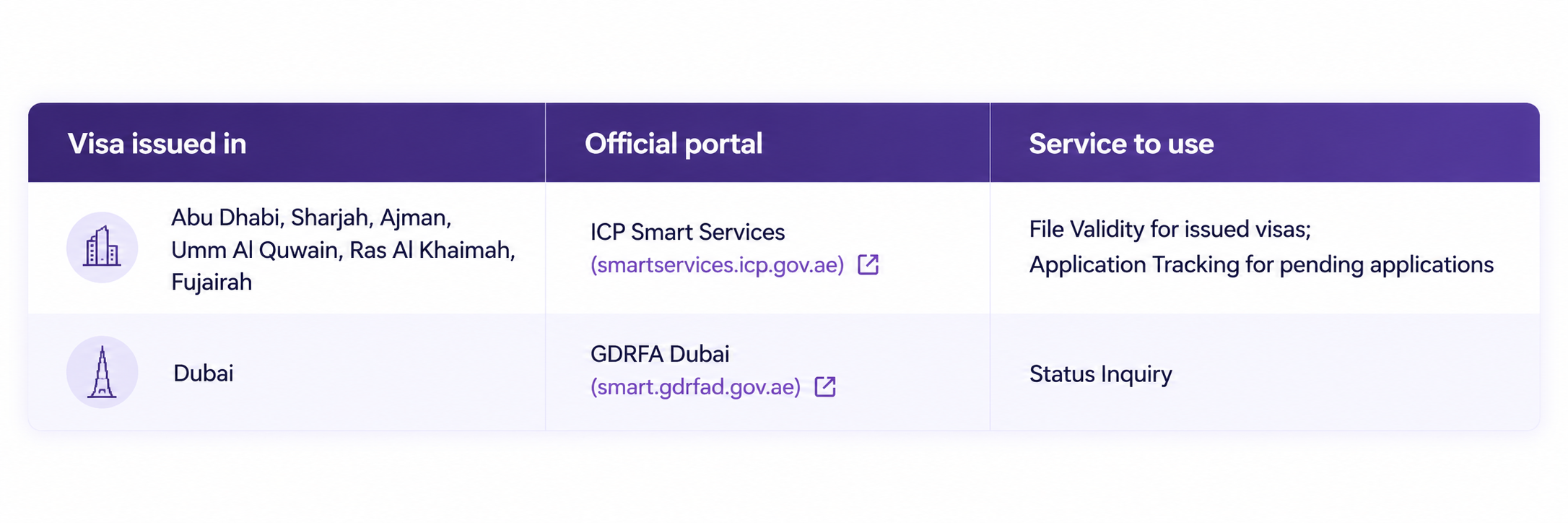
Before you check UAE visa status online, identify the authority handling your visa. The correct portal generally depends on the emirate or immigration authority that processed your visa, not simply where you currently live.
Application status vs visa validity: tracking shows where an application stands, such as under review, approved or rejected. File validity shows the issue and expiry dates of a visa that has already been issued. Use the service that matches your stage.
Use the official service that matches the authority handling your visa. ICP provides online visa, residence and application-status services, while Dubai visa enquiries are handled through GDRFA Dubai.
If you are unsure which authority handled your visa, check your visa, entry permit or application documents before starting the search.
UAE Visa Status Check by Passport Number on ICP
For visas handled through ICP, use the relevant ICP Smart Services enquiry or validity service. The information required depends on the service you select.
- Open the ICP Smart Services website and go to File Validity under public services.
- Under Search by, select Passport Information.
- Choose Visa for an entry permit or visit visa, or Residency for a residence visa.
- Enter your passport number and passport expiry date exactly as printed.
- Select your nationality from the list.
- Complete the security check and click Search.
If you already have an Emirates ID or file number, you can search by File Number instead.
Tracking a New Application
If you are wondering how to check visa status for an application that has not been issued yet, use ICP’s Application Tracking service with the application or request number given when you applied. For a new application that is still being processed, use ICP’s Application Tracking service with the application or request number provided when you applied.
Dubai Visa Status Check Online Through GDRFA
If your visa or application is handled in Dubai, use the official General Directorate of Identity and Foreigners Affairs – Dubai (GDRFA Dubai) enquiry services.
- Visit the official GDRFA Dubai website.
- Open the relevant visa or application enquiry service.
- Select the available search option for your case.
- Enter the requested visa, application, file or personal details.
- Complete the verification step and submit your enquiry.
- Review the status or validity information displayed.
For an application that is still being processed, use the relevant application-tracking option and keep your application or transaction details ready.
Other Ways: How to Check Visa Status Without the Website
If you cannot check visa status online through the website, try these official channels:
- Mobile apps — use the official ICP or GDRFA Dubai app to access available immigration and visa enquiry services from your phone.
- ICP support — call 600 522222 from inside the UAE or +971 600 522222 from outside the UAE.
- GDRFA helpline — call 800 5111 inside the UAE, or +971 4 313 9999 from abroad, for Dubai visas.
- Service centres — Amer centres in Dubai and ICP-approved typing centres in other emirates can check on your behalf.
- Your sponsor — an employer, family sponsor or travel agent who applied for you can see the application status directly.
Use official government portals and avoid sharing passport details with unverified third-party websites.
Details You May Need to Check UAE Visa Status
Keep these details ready before you start a UAE visa status check by passport number:
- Passport number — exactly as printed, including any letters
- Passport expiry date — for the ICP passport search
- Nationality — as shown in your passport
- Date of birth — some searches ask for it
- Visa type — Visa (entry permit) or Residency
- Application or file number — optional, but useful for tracking new applications or searching by file
To check visa status UAE records hold, use the same passport that was used for the visa application. If you renewed your passport after the visa was issued and cannot find the record, check the visa details linked to your previous passport or contact the relevant authority for guidance.
Understanding Your Visa Status Results
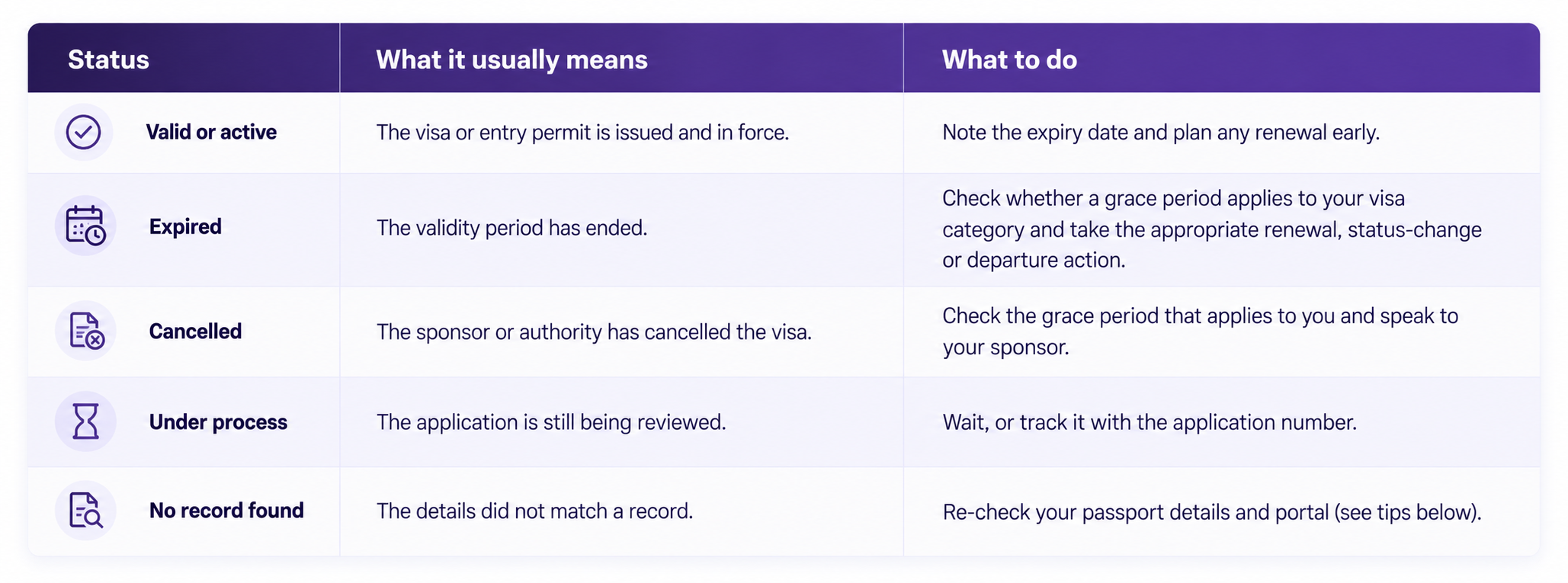
The information displayed after a UAE visa status check online depends on the service used. The exact wording can vary, but common visa or application results may indicate the following:
UAE residence information is linked to the Emirates ID and digital immigration records, making official online services useful for checking current residence details.
Checking for Overstay Fines
If your visa or residence has expired or been cancelled, check whether a grace period applies to your category before assuming that an overstay fine has started.
ICP currently lists an overstay fine of AED 50 per day after the applicable permitted stay or grace period ends. Grace periods can differ by visa or residence category, so check your individual status through the relevant authority.
Confirming a Visa Is Genuine
If you receive a visa or entry permit through a third party, verify its details through the relevant official ICP or GDRFA channel. If you cannot confirm the record, contact the responsible authority before relying on the document.
How to Find Your Visa Number and Download Your Visa
Finding Your Visa or File Number
Your visa, entry permit or immigration record may contain reference details such as a file number or UID. If these details are not available through the enquiry result, check the issued document or contact the relevant authority or sponsor.
Downloading Your Visa
- Application records — check the email address or account used when the visa application was submitted for available visa documents.
- Official portals and apps — depending on the service, the applicant or sponsor may be able to access issued visa documents through the relevant ICP or GDRFA account.
- Your sponsor or agent — if someone applied on your behalf, ask them for a copy of the issued visa document.
A passport-based status enquiry is primarily used to verify visa information. Access to a downloadable visa copy may depend on the service and the account through which the original application was submitted.
Common Errors and How to Fix Them
If you cannot find your visa record online, check these common issues:
- Wrong authority — use GDRFA Dubai for Dubai-related visa enquiries and the relevant ICP service for visas handled through the federal authority.
- Typing errors — check every character of your passport number and use the date format shown on the page.
- Wrong nationality — select the nationality on your passport, not your country of residence.
- Wrong visa type — switch between Visa and Residency on ICP.
- Renewed passport — try your old passport number if the visa was issued on it.
- Visa not issued yet — use application tracking instead of the passport search.
- Site not loading — clear your browser cache, try another browser or use the official app.
If your UAE visa status check online by passport number still fails, contact ICP or GDRFA directly.
How Start Any Business Can Help
Checking your visa status is only the first step. If you need support with an eligible UAE residence or business-related visa process, Start Any Business (SAB) can guide you through the applicable requirements.
Depending on your case, our support may include:
- Visa guidance — understanding the next steps based on your visa or application status
- Residence and employment visa support — eligible applications, renewals and status changes
- Investor and partner visas — residence linked to eligible UAE business setups
- Freelance visa guidance — support for applicable freelance permit and residence routes
- Golden Visa guidance — eligibility and application support
- Visa renewals and cancellations — guidance on applicable immigration procedures
Conclusion
Knowing how to check UAE visa status helps you confirm important visa or residence information before travelling, renewing your residence or completing another immigration process.
Use the appropriate official channel for your case: ICP for federal immigration services and GDRFA Dubai for Dubai-related visa services. Keep your passport and application details ready, check the information carefully and contact the relevant authority if the online result does not match your records.
Frequently Asked Questions
Can I check my UAE visa status using only my passport number?
You can use passport details for certain UAE visa enquiries, but additional information may be required depending on the authority and service. This can include nationality, passport expiry date, date of birth or other visa details.
How to download UAE visa by passport number?
A passport search confirms the visa but does not always provide a printable copy. The e-visa is usually emailed to whoever applied, or can be printed from their ICP or GDRFA account, so ask your sponsor or agent if you did not apply yourself.
How to check UAE visa status without paying?
Start with the official ICP or GDRFA Dubai website or app rather than a third-party visa checker. Use the relevant government enquiry service for your visa or application.
How do I know if my UAE visa is cancelled?
Check your visa information through the relevant ICP or GDRFA Dubai service. If you believe your visa has been cancelled but the online information is unclear, confirm the status with your sponsor or the relevant immigration authority.
How to check visa status without a passport number?
Depending on the ICP service, other reference details such as your file, application or request number may be available for the search. For a pending application, use the application-tracking service with the required reference details.
Need Help With Your UAE Visa?
Checked your visa status and not sure what to do next? Start Any Business can guide you through eligible UAE visa applications, renewals, status changes and business-related residence procedures.